
Short answer: Kayak, Trivago and Google Hotels are search engines for hotels. You start there, browse many hotels and click out to a booking site. Hotel Ninja works the other way around: you’re already on a hotel page on a booking site, and it shows what that same room costs on the other sites. They solve different problems, and lots of people use both: a search engine to pick the hotel, Hotel Ninja to make sure they’re paying the best price for it.
We get asked this a lot: “Why do I need Hotel Ninja if I have Kayak?” Fair question. We’ll try to answer it honestly, including where the other tools are better.
Why we built Hotel Ninja in the first place
Kayak and Trivago are places you have to go to. But lots of people never start there. They read a travel blog, click a link, and land straight on a hotel page on a booking site. Opening Kayak or Trivago at that point is an extra step, and even then you still have to click through to each site to read the details.
Our founder, Talia Klein Perez, wanted the comparison to show up right where people already are, on the booking site, with all the info in view. Her own family doesn’t use Google Hotels or Kayak. They research on their favorite booking site, because its filters are comfortable and they know their way around it. Then they book on whichever site is cheapest for that room. Hotel Ninja is what makes that second part take seconds.
What Kayak, Trivago and Google Hotels do
These are metasearch sites. You type a city and dates, they pull in prices from many booking sites and hotels, and you click through to book somewhere else.
- Kayak is owned by Booking Holdings, the same group as Booking.com and Agoda.
- Trivago is majority-owned by Expedia Group, the group behind Expedia and Hotels.com.
- Google Hotels is part of Google Search and Google Maps.
They’re great for discovering hotels: maps, filters, photos, lots of options in one place.
What Hotel Ninja does differently
Hotel Ninja isn’t a search site. It’s a free Chrome extension that sits on top of the booking sites you already use. Open a hotel on Booking.com, Expedia, Hotels.com, Agoda or another supported site, pick your dates and guests, and a small popup shows what the same room costs on the other sites, with taxes and fees included.
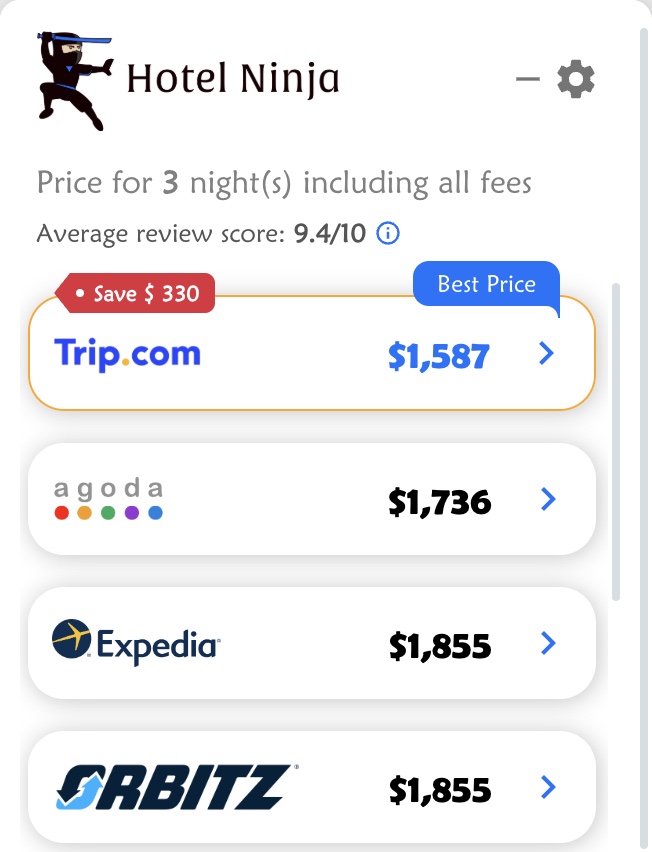
So instead of starting over on another site, you get the comparison right where you’re about to book.
Side by side
| Kayak, Trivago, Google Hotels | Hotel Ninja | |
|---|---|---|
| Where you use it | Their own website or app | On the booking site you’re already on |
| Best for | Finding and shortlisting hotels | Checking the price of the hotel you picked |
| Price shown | Varies. Some show the nightly rate first, some let you switch to the total | The total for your stay, taxes and fees included |
| Your guests and dates | You enter them again on each site you click to | Taken from the page you’re on |
| Phone | Yes | Not yet. Chrome on a computer |
| Account needed | No | No |
Where the search engines are better
Let’s be fair:
- Discovering hotels. If you don’t know where to stay yet, a map full of options beats a popup.
- On your phone. Hotel Ninja works in Chrome on a computer for now.
- Hotels’ own websites. Search engines sometimes include the hotel’s direct price.
Where Hotel Ninja is better
- No starting over. You’ve spent an hour choosing the hotel. The popup checks the price without making you search again.
- The same room, the same guests. It compares the room and guest count from the page you’re on, so families don’t have to re-enter kids’ ages everywhere.
- Final prices. Taxes and fees are included, so you’re comparing what you’ll actually pay.
- Your filters. Turn on free cancellation on the booking site, and Hotel Ninja compares only matching rates.
How we’d use them together
- Use Google Hotels, Kayak or Trivago to find a hotel you like.
- Open that hotel on the booking site you trust most.
- Let Hotel Ninja show you the same room on the other sites.
- Compare the conditions (cancellation, breakfast, room type), then book where it’s best.
More on doing this well: how to compare hotel prices across booking sites and how our price comparison tool works.
Frequently asked questions
Is Hotel Ninja a hotel search engine like Kayak?
No. Hotel Ninja doesn’t search for hotels. It works on hotel pages on booking sites you already use and shows the same room’s price on the other sites.
Can I use Hotel Ninja and Kayak together?
Yes. Many people use a search site to choose a hotel, then open it on a booking site and use Hotel Ninja to check the price before booking.
Does Google Hotels show the total price?
It depends on your settings and the hotel. Look for the option to show total price, including taxes and fees, before you compare.
Does Hotel Ninja work on my phone?
Not yet. It works in Google Chrome on a computer.
Is Hotel Ninja free?
Yes. No account, no sign-up, and you book on whichever site you choose.