Short answer: Yes, both are legitimate, large booking sites. Agoda is part of Booking Holdings, the same group as Booking.com, and Trip.com belongs to Trip.com Group, a publicly listed travel company. Most problems people run into come from the fine print, not from fraud: who charges your card, in what currency, and what the cancellation rules say. Read those, keep your confirmation, and you’re in good shape.
Here’s a moment we see all the time. You find the hotel you want. You check the price on a few sites. The cheapest one is Agoda or Trip.com, and suddenly you hesitate. “Is this site real? Will my booking actually exist when I show up?”
It’s a fair question. You’re handing over your card details for a trip that matters. So let’s look at what these sites are, and where people actually get caught out.
Is Agoda legit?
Yes. Agoda started in Asia and has been part of Booking Holdings since 2007, the same parent company that owns Booking.com, Priceline and Kayak. It’s especially strong in Asia, but it lists hotels around the world.
Things worth knowing before you book on Agoda:
- Pay now or pay later. Some rates are charged right away by Agoda, others are paid at the hotel. Check which one you picked.
- The currency of the charge. The price you see may be shown in your currency but charged in another, which can add card fees. See our guide to which card to use when you travel.
- Taxes and fees. Make sure you’re looking at the final price, not a price before taxes.
Is Trip.com safe?
Yes. Trip.com is the international brand of Trip.com Group, one of the largest travel companies in the world, listed on the Nasdaq and the Hong Kong stock exchange. It’s been around under different names since 1999 and is especially big in Asia, though it sells hotels and flights worldwide.
The same checks apply: who charges you, in what currency, and what the cancellation terms say. Trip.com often has its own member prices, so compare the same room and the same conditions.
Why are they sometimes cheaper?
Each booking site negotiates its own deals with each hotel, runs its own sales and loyalty discounts, and sometimes gets a different share of rooms to sell. So the same room on the same dates can cost a different amount on Agoda, Trip.com, Booking.com and Expedia. A lower price doesn’t mean something’s wrong. It usually just means that site has a better deal that day.
In real searches we ran in October 2026, Agoda came out cheapest for a family stay in Berlin and in Cyprus, and Trip.com came out cheapest for a 7-night stay in New York. Next week, for other hotels, the winner can be someone else entirely. That’s exactly why it pays to compare.
Our founder, Talia Klein Perez, books on Agoda a lot when her family travels in Thailand, Japan and Singapore, because in Asia it’s almost always the cheapest. The family has booked through Trip.com too, and it went smoothly. And in all those stays, she can’t remember a single time a hotel couldn’t find the booking.
Where people actually get caught out
- Booking through a fake look-alike site or ad. Type the address yourself or use the official app.
- Comparing different conditions. A cheap non-refundable rate next to a refundable one isn’t a fair fight.
- Not reading the room details. Bed types, breakfast and room size can differ between sites for rooms with similar names.
- Currency surprises. A charge in a foreign currency can come with a card fee or a poor exchange rate.
How to book on Agoda or Trip.com with confidence
- Book on the official site or app.
- Check the cancellation policy and the deadline (it’s usually in the hotel’s local time).
- Check who charges you and when, and in which currency.
- Save the confirmation email and the booking number.
- A few days before arrival, you can email or call the hotel to confirm they have your reservation.
Check the reviews, but use the right ones
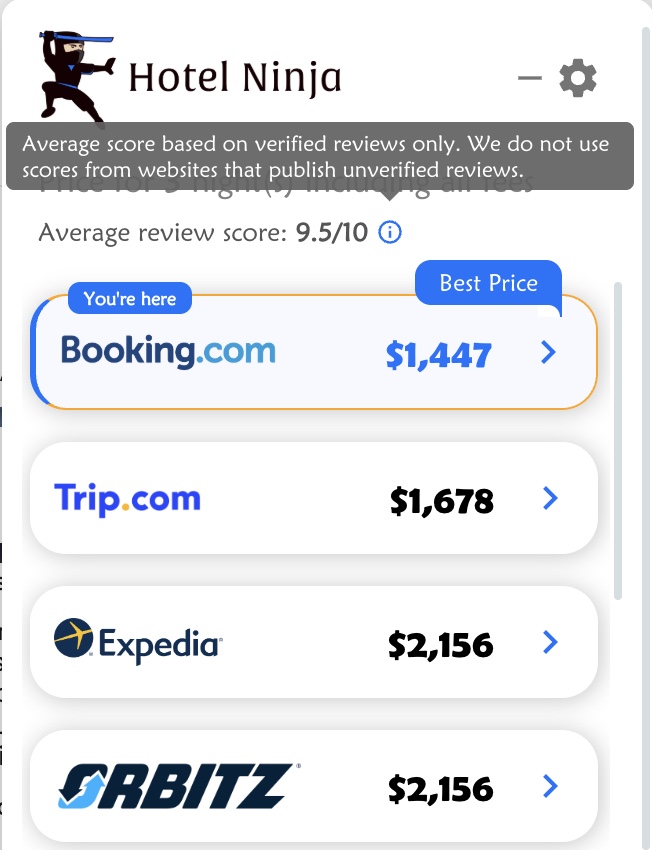
Review scores can be messy, because some sites publish reviews from people who never stayed at the hotel. In the Hotel Ninja popup, the average review score uses verified reviews only. We skip scores from websites that publish unverified reviews.
Compare first, then decide
Hotel Ninja is a free Chrome extension for your computer. Open a hotel on Booking.com, Expedia, Hotels.com, Agoda or another supported site, and it shows what the same room costs on the other sites, Trip.com included, with taxes and fees. Then you decide where to book, with the full picture.
Want the bigger picture? Read what is the best site to book hotels and how to compare hotel prices across booking sites.
Frequently asked questions
Is Agoda a real company?
Yes. Agoda is a large online travel agency that has been part of Booking Holdings, the parent company of Booking.com, since 2007.
Is Trip.com the same as Ctrip?
They’re part of the same company. Trip.com Group was founded as Ctrip in 1999. Trip.com is its international brand.
Why is Agoda cheaper than Booking.com?
Not always, but it can be. Each site gets its own deals from each hotel and runs its own discounts, so prices for the same room can differ. Compare the final price and the same conditions before you book.
What should I do if the hotel can’t find my booking?
Show your confirmation email and booking number, then contact the booking site’s customer service right away. That’s why it’s worth confirming with the hotel a few days before arrival.
Is it safe to pay on Trip.com or Agoda?
Yes, on their official sites and apps. Check the currency of the charge and if you’re paying now or at the hotel.