
Short answer: To compare hotel prices across booking sites, look up the exact same room, dates and guests on each site, go all the way to the final checkout price (with taxes and fees), and make sure the meal plan and cancellation terms match. Or let a free tool like Hotel Ninja do it for you while you browse.
Here’s a fun travel secret: the same hotel room often costs different amounts on Booking.com, Expedia, Hotels.com and Agoda. At the same time. For the same dates. It’s easy to assume your favorite site has the best deal, but loyalty to a booking site is rarely rewarded.
Here’s how we compare hotel prices properly, by hand or the lazy (smart) way.
How to compare hotel prices by hand
- Pick the hotel first. Find the place you want on whichever site you like browsing.
- Match the details exactly. Same dates, same number of adults, same kids with the same ages, same room type. A “family room” on one site can be a double with a sofa bed on another, so check the beds.
- Go to the final price. Click through to the last step on each site. Many sites show a low base rate and add taxes and fees at checkout. Some only show the nightly rate until the end.
- Match the conditions. Compare refundable with refundable, and breakfast with breakfast. A cheaper non-refundable room without breakfast isn’t the same product.
- Check “pay at property.” A city tax collected by the hotel on arrival isn’t part of any site’s checkout price.
- Convert currencies. If sites show different currencies, put everything in one before deciding.
It works. It also takes ages, and by tab number seven you’ll forget which price belonged to which site.
Why the same room costs different amounts
Hotels sell the same rooms through several booking sites at once, and each site plays by its own rules. They negotiate their own rates with the hotel, run their own promotions and member discounts, and add taxes and fees in their own way. The result is a real price gap for the exact same room, on the exact same night. Nobody’s doing anything shady. You just have to look.
The faster way: compare in your browser
Traditional comparison websites make you start a new search on their platform and retype everything. We wanted something that works where you already are, so we built Hotel Ninja.
It’s a free Chrome extension. Open a hotel on Booking.com, Expedia, Hotels.com, Agoda or another supported site, and Hotel Ninja picks up the hotel, your dates, your guests (including kids’ ages) and the room type. Then it checks the same room on the other sites and shows the final checkout prices, taxes and fees included, side by side in a small popup.
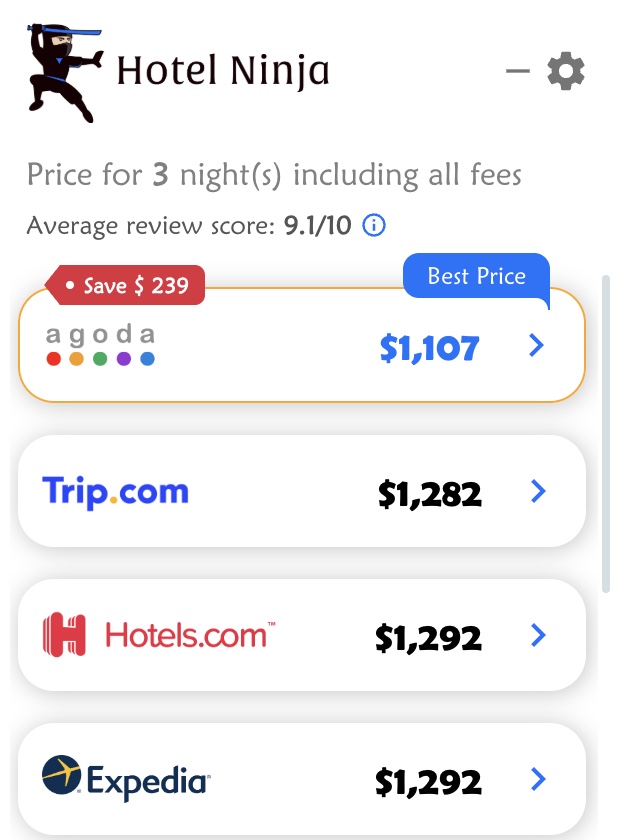
How it works
- Install the free Chrome extension
- Search for hotels on a supported booking site like you always do
- Open a hotel you like
- Give Hotel Ninja a moment to compare prices on other sites
- Check the popup and click through to book on the cheapest site
It compares the right room for your group
A lot of comparison tools show you the cheapest room at the hotel. That’s not much help if you need a family room or a suite. Hotel Ninja compares the room type you’re actually looking at. Booking a standard double for two? It checks standard doubles. Need a family room for four or more? It compares family rooms, and carries over the kids’ ages too. No need to fix the guest count on every site.
Filters for a fair fight
Want free cancellation or a meal plan (breakfast, half board, full board or all-inclusive, where supported)? Turn on that filter on the booking site, and Hotel Ninja compares only the matching rates on the other sites. There’s also an average review score based on verified reviews only, so you can sanity-check the hotel while you’re at it.
By hand vs. Hotel Ninja
| By hand | With Hotel Ninja | |
|---|---|---|
| Tabs open | One per booking site | The one you’re already on |
| Matching room and guests | Retype on every site | Matched for you, kids’ ages included |
| Final price with taxes and fees | Click to checkout on each site | Shown in the popup |
| Free cancellation and meal plans | Check each listing | Uses the filters you set on the booking site |
| Cost | Free, plus your evening | Free |
Why bother comparing?
Because small differences add up. If you book hotels a few times a year, comparing every stay keeps more of your budget for the fun stuff, like room service you didn’t plan on. It also means you never overpay just because a site feels familiar.
No account, no sign-up, and you always book directly on the site you choose.
Frequently asked questions
Why does the same hotel room cost different amounts on different sites?
Each booking site negotiates its own deals with hotels, runs its own promotions and member discounts, and adds taxes and fees in its own way. So the same room can have different final prices at the same moment.
What should I compare when comparing hotel prices?
The final checkout price for the same room, dates and guests, with the same meal plan and cancellation terms. Also check for any city tax paid at the hotel, since it isn’t included in online checkout prices.
Is there a tool that compares hotel prices automatically?
Yes. Hotel Ninja is a free Chrome extension that shows the final price for the same room on other booking sites while you browse Booking.com, Expedia, Hotels.com, Agoda and other supported sites.
Is Hotel Ninja free?
Yes. Hotel Ninja is free to install and use, with no account and no subscription. When you book through one of our links, the booking site may pay us a small commission at no extra cost to you.
Does Hotel Ninja work on my phone?
Not yet. Hotel Ninja works on Google Chrome on a computer. It isn’t available for Safari, Firefox or phones yet.