

You find a hotel at $110 a night, you’re pretty happy about it, and then you reach the last page of the booking. Suddenly there’s a cleaning fee, a service fee, and a city tax, and the “deal” doesn’t look like a deal anymore.
It happens to almost everyone. The good news is that a few small habits can fix most of it. None of these are tricks. They’re just the things we wish we had known earlier.
1. Look at the total price, not the nightly rate
The big number on the search page is rarely what you pay. Depending on where you’re going, the final price can include cleaning fees, resort fees, service charges and local taxes, and some sites only show them on the very last step.
Before you compare anything, open the full price breakdown and look at the total for your whole stay. A $95 room with $40 in fees costs more than a $120 room with none.
2. Check for city tax and resort fees
Many cities charge a tourist tax per person, per night. In a lot of European and Japanese cities you pay it at the front desk when you arrive, so it never appears in your booking. In the US, resort fees in places like Las Vegas, Orlando and Hawaii can add a noticeable amount every night.
Read the “pay at property” line in the booking details. If it’s there, add it to your total so you’re comparing honestly.
3. Compare the same room on more than one site
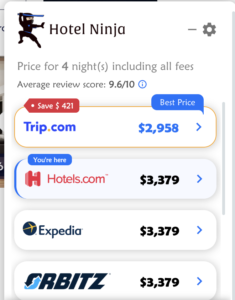
This is the one that saves the most money. The same room, on the same dates, can have different prices on Booking, Expedia, Agoda, Hotels, Trip and the hotel’s own website. Each site has its own commissions, promotions and member discounts, and they don’t always match.
Sometimes the hotel’s own site is cheapest. Sometimes it isn’t. You can’t know until you check.
Doing this by hand means a lot of open tabs, and it’s easy to end up comparing different rooms without noticing. That’s the reason we built Hotel Ninja: it’s a free Chrome extension that shows you the final price for the same room on other sites while you browse, so you don’t have to go looking. This actually saved us several hundreds dollars when we booked a hotel we wanted in Tokyo.
4. Compare like with like: cancellation and breakfast
A cheaper price is often a stricter one. It might be non-refundable, or it might leave out breakfast. If one site charges $5 less but doesn’t include breakfast, and you’re a family of four, you’re not saving anything.
Before you pick the lowest number, check that both offers have the same cancellation terms and the same meal plan. If one is half board and another is all-inclusive, it’s a different product, even if the room is identical.
5. Book with free cancellation, then check again
If you’re not sure about your plans, choose a free cancellation rate, even if it costs a little more. Then look at the price again a week or two before you travel. Hotel prices move, and if yours has dropped, you can cancel and rebook at the lower rate.
One thing to watch: free cancellation usually has a deadline, often a specific time on a specific day in the hotel’s local time. Put it in your calendar so it doesn’t slip by.
6. Search with your real group size
If you’re traveling with kids, enter the real number of adults and children from the start. Some searches show the cheapest double room, which looks great until you find out it doesn’t fit your family and the price jumps once you add the extra guests.
Searching with the right numbers gives you rooms that actually work for you. Hotel Ninja does the same: it shows the cheapest room for the number of people you entered, not the cheapest room in the building.
7. Pay in the local currency and know your card fees
When a hotel terminal asks if you’d like to pay in your home currency, say no. It sounds convenient, but the exchange rate is usually worse than what your card would give you. Pay in the local currency instead.
Also check whether your card charges a foreign transaction fee. If it does, a card without one can save you a few percent on every booking.
When you compare prices across sites in different currencies, convert them to one currency first. Hotel Ninja can show prices in multiple currencies, which makes this easier.
Planning a trip? Install Hotel Ninja for Chrome and see the final price for your room across sites, before you book.