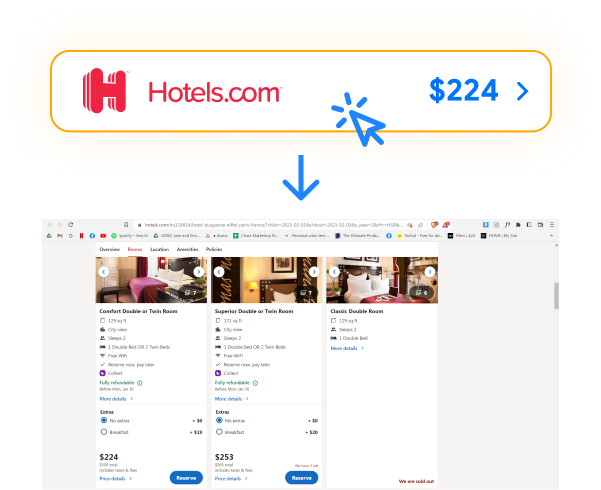
Finding the best hotel price shouldn’t require opening ten browser tabs. Hotel Ninja compares prices for you automatically, showing the lowest rate across all major booking platforms.

Most comparison tools show you the cheapest available room at a hotel. That’s useless if you need a family room or a suite. Hotel Ninja compares prices for the specific room type you’re viewing. Searching for a family suite? You’ll see prices for that exact suite across all sites. You may even find a room that isn’t available op the website you searched!
You find the perfect hotel on Booking.com. But is it actually the best price? The same room may cost less on Expedia, Hotels.com, or Agoda. Checking manually takes forever. Hotel Ninja solves this. Install once, and every time you view a hotel room, you instantly see prices across all booking sites. Book confidently knowing you found the best deal.
Hotel prices change constantly. Hotel Ninja checks current rates the moment you search.
See complete prices including all taxes and fees. Compare true costs, not misleading rates.
Found a better price? Click through directly and complete your booking. No complicated redirects.
Booking sites offer different promotions and discounts. Hotel Ninja catches them all so you never miss a deal.
The average Hotel Ninja user saves $47 per booking by finding better rates, and some save hundreds! Over a year of travel, that adds up to hundreds, if not thousands, of dollars back in your pocket for experiences, not overpaying for the same hotel room.
Hotels distribute inventory across multiple booking platforms, each with different pricing strategies. The same room at the same hotel can legitimately cost different amounts depending on where you book. Booking sites negotiate their own rates with hotels. They run different promotions. They have different fee structures. This creates genuine price differences that you can exploit by comparing before booking.
Opening multiple tabs, searching each site, noting prices, calculating total costs with fees – it’s exhausting. Hotel Ninja automates the entire process in seconds. You get the information you need without the hassle.
Privacy Protected
Hotel Ninja doesn’t track your browsing or sell your data. The extension only activates on hotel booking sites and works locally in your browser. Your privacy matters to us.

Nice, saved $124, I always book on Booking but this found me the same room for cheaper on Expedia.


Frequently Asked Questions
Yes, Hotel Ninja is completely free to use with no subscription fees or hidden costs. We earn a small commission when you book through our links, but this never affects the price you pay. The hotel booking sites pay us, not you.
Booking.com, Expedia, Hotels.com, Agoda, Travelocity, and Orbitz.
We’re actively working to add more booking platforms, including direct hotel website comparisons.
Yes, Hotel Ninja works worldwide on all supported booking sites, regardless of which country you’re in or where you’re traveling. Whether you’re booking a hotel in Tokyo, Paris, New York, or anywhere else, Hotel Ninja compares prices across all platforms.
Yes. Hotel Ninja is completely safe. The extension:
We take privacy seriously and only use the minimum permissions necessary to compare hotel prices.
Installing Hotel Ninja takes about 30 seconds:
Currently, Hotel Ninja is a desktop browser extension only. We’re developing a mobile version and will announce it when available. For now, you can use Hotel Ninja on your laptop or desktop computer.
No account is needed. Simply install the extension and start using it immediately. There’s no registration, no login, and no personal information required.
Chrome automatically updates extensions in the background. You don’t need to do anything. When we release new features or improvements, your extension will update automatically.
When you view a hotel room on any supported booking site, Hotel Ninja automatically:
This all happens within a few seconds.
Hotel Ninja compares the same room configuration you’re viewing. This is a key difference from other comparison tools. If you’re looking at a room for four, Hotel Ninja shows you prices for rooms that fit your party size across all booking sites, not just the cheapest room available at the property, which may not have enough room for your entire party.
Yes. Hotel Ninja pulls real-time pricing directly from booking sites’ APIs at the moment you search. Prices are current and accurate, including all taxes, fees, and charges. The price you see in Hotel Ninja’s comparison is the actual price you’ll pay at checkout.
Yes. All prices shown in Hotel Ninja’s comparison include:
The price you see is the final price you’ll pay. No surprises at checkout.
Hotel Ninja collects minimal anonymous data to improve the service:
We do NOT collect:
No. Hotel Ninja never accesses, sees, or stores any payment information. When you click through to book a hotel, you complete the transaction entirely on that booking site. Hotel Ninja is only involved in the price comparison step, not the payment process.
No. We don’t collect enough data to sell, and we wouldn’t sell it even if we did. Your privacy matters to us. We earn money through affiliate commissions when you book hotels, not by selling data.
Yes. When you click through Hotel Ninja to book on a site like Booking.com or Expedia, you still earn all the loyalty points, rewards, and benefits you would if you booked there directly. Hotel Ninja doesn’t interfere with loyalty programs at all.
Since you book directly with the booking site (not Hotel Ninja), you’ll manage any changes or cancellations through that site’s customer service. Check the cancellation policy before booking, and contact the booking site directly for any modifications.
Thank you! You can help by:
Every recommendation helps more people save money on hotels!
The key difference is where comparison happens:
Travel comparison sites: You leave the booking site, search on their site, compare results, then return to a booking site to complete your reservation.
Hotel Ninja: Comparison happens automatically right on the booking site you’re already using. No site-switching, no duplicate searches. You see all prices instantly in one place.
Additionally, Hotel Ninja compares the exact room size you’re viewing, not just the cheapest available room at the property.
We use cookies to improve your experience on our site. By using our site, you consent to cookies.
Manage your cookie preferences below:
Essential cookies enable basic functions and are necessary for the proper function of the website.
These cookies are needed for adding comments on this website.
Statistics cookies collect information anonymously. This information helps us understand how visitors use our website.
Google Analytics is a powerful tool that tracks and analyzes website traffic for informed marketing decisions.
Service URL: policies.google.com (opens in a new window)